
Local AI
The application and its AI run entirely on your PC: filing, sorting, summarising or writing sends nothing. No key, no usage costs, even offline.
Security & privacy
Zenalp was designed local-first from the very first line of code. No central server, no online account, no copy of your documents anywhere but your computer. The AI itself runs on your PC; and if you choose an online AI, it only receives a masked text.
The application and its AI run entirely on your PC: filing, sorting, summarising or writing sends nothing. No key, no usage costs, even offline.
If you wish, your own Anthropic, OpenAI, Gemini or Grok keys, encrypted on your device. Before sending, names, companies, addresses and numbers are replaced by placeholders; you review, and the answer comes back in plain text.
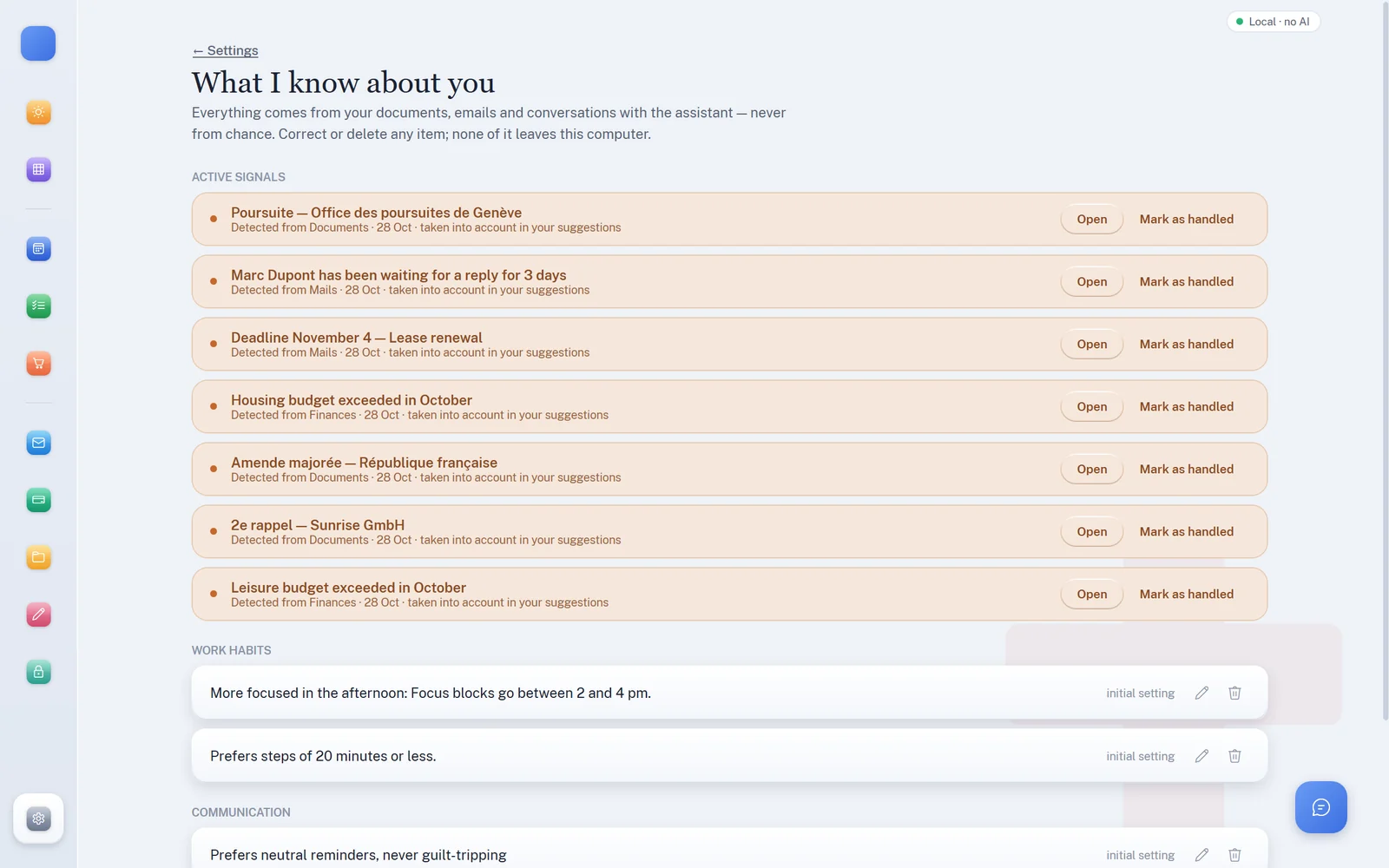
The “What I know about you” screen lists everything the app has remembered, with its source. Every item can be corrected or erased; “Delete everything” is always there.
Data minimisation
With the local AI, nothing is sent: these rules protect what is sent when you choose an online AI. Our rule is not “anonymise what is sent” but “only send what has already been reduced to the bare minimum”: text rather than images, metadata rather than content, a signal rather than a document.
For document help, Writing and the assistant, people's names, companies, addresses, references, company and VAT numbers, phone numbers, emails, IBANs and AHV numbers are replaced by placeholders ([PERSONNE_1], [SOCIETE_1]…), and amounts if you ask. The mappings stay on your PC, and the answer comes back in plain text. Online email sorting and summaries, filing and micro-steps mask IBANs, AHV numbers and emails.
Why: This information adds nothing to the task, but is the biggest risk. Masking it systematically rules out any oversight.
A request prepared for the local AI is not masked, since it never leaves your PC. If the local AI stops before sending, Zenalp never sends it to an online AI in its place: it tells you, and you start again.
Why: An unmasked text must never be sent by accident.
A document is read first on your PC (the PDF’s text layer, Windows text recognition). Only the extracted text can then be sent — never the image or the original file.
Why: An image always contains more information than needed: layout, visual elements, metadata.
Swiss QR-bill, SEPA QR and Factur-X are decoded 100% deterministically: creditor, IBAN, amount and reference never touch a language model.
Why: This data is already structured and reliable at source: an AI would only add risk and cost.
Each use has its limit: about 600 characters to sort an email, 4,000 to read it through the assistant, 6,000 for a document. Beyond that, the text is cut.
Why: Limiting length mechanically limits what could leak from an otherwise relevant text.
Searching for an email or a document from the assistant returns a list: date, sender name and domain, subject, status. The content is only read if you have allowed it.
Why: “Did I get an email from the bank?” only needs metadata to be answered.
Two separate permissions — “Reading” (content of emails and documents) and “Calendar” (writing events) — are off by default. Turning on “Reading” requires re-entering your password.
Why: Wider access should be a considered choice, never a silent setting.
The context sent to the assistant contains the date, task titles, active signals and the budget — never document text, whatever the question.
Why: The assistant reasons about the overall situation; details are only fetched when you ask.
In Organisation coach mode, the assistant has no tool to access data. It receives a summarised signal (“received a payment reminder”) and points to real help if the situation calls for it.
Why: This is the most personal mode: minimisation is at its strictest here.
Before calling an online AI from a document, Writing or the assistant, Zenalp shows exactly what will be sent — masked text that you can correct — along with the estimated cost. Nothing is sent without a click on “Send”. With the local AI this step disappears: nothing is sent.
Why: Trust is built by showing, not by promising.
Known AI answers are looked up by a SHA-256 fingerprint of the context, never by the text itself.
Why: Even locally, less readable data means less risk if the device is lost.
An API key’s validity is checked with a neutral call (listing the available models), never with your content.
Why: Even a technical check must not become a channel of exposure.
Voice dictation goes to Grok or OpenAI (your choice), unless you install a dictation server on your PC: your voice then never leaves the computer. Online, it is turned on each time with the microphone button, with the cost shown live.
Why: We prefer to name our exceptions clearly rather than promise an absolute guarantee.
Encryption
Each account has its own folder and its own encrypted database. Nothing is shared between accounts on the same computer.
No back door. Without your password or recovery key, your data is unreadable — including to us. That is a deliberate choice: since there is no central server, nobody can “recover” your account for you.
Our commitments
No email sent, no bill paid, no document filed for good without your explicit action — recipient included.
To pay, Zenalp shows the QR code to scan in your e-banking app or TWINT. No direct connection to your bank accounts.
No online account, no telemetry: the app only contacts our hosting to check for updates. And this site itself uses no tracking cookies, no third-party audience measurement and no fonts hosted elsewhere: its visit statistics are anonymous and stay with us.
New versions are offered to you; they only install after your click, never silently.
Try Zenalp on your computer: your data will stay there.