Designed in Switzerland · Local AI · For Windows

A clear mind.
Everything else, sorted.

Zenalp brings your calendar, email, finances and documents together in one assistant. It reads your bills, sorts your emails and files your documents with an AI that runs on your computer — and suggests just one thing at a time. Nothing goes anywhere else unless you decide so.

Windows 10 and 11 Local AI, no key needed AES-256 encrypted data
Zenalp — Today
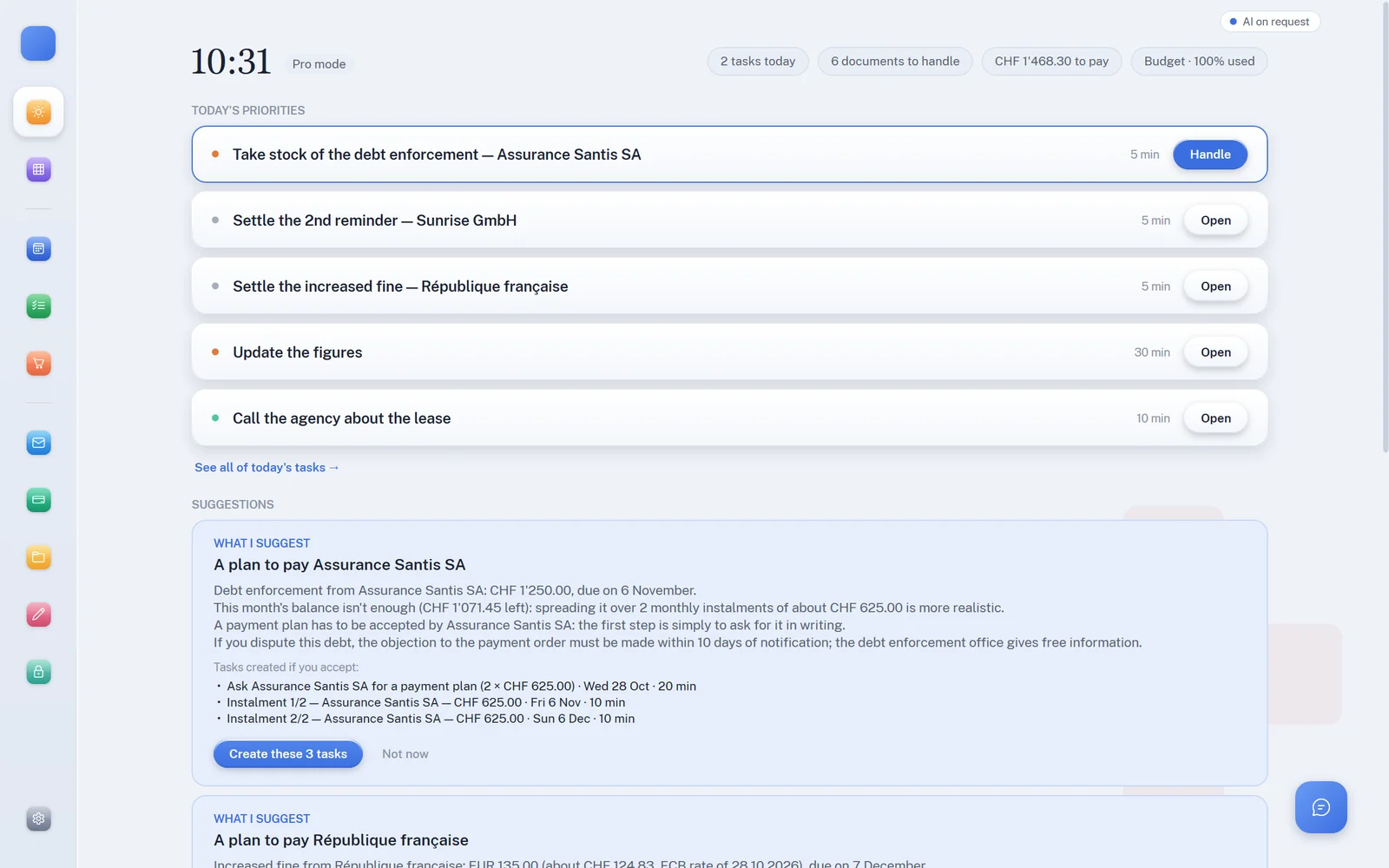
Zenalp’s Today view: a single suggested next step, a proposed payment plan, and the rest of the day.
QR-bill readCHF 128.40 · IBAN and reference read without AI
Filed by the local AIHousing → Energy · nothing left your PC
Draft readyReply to Marc · review before sending
  • Today
  • Calendar
  • Tasks
  • Email
  • Finances
  • Documents
  • Assistant
  • Meals
  • Writing

Your AI, at home

The AI works on your computer

Zenalp files, sorts, summarises and breaks down your tasks with an AI installed on your PC. An online AI remains possible as a back-up: it then only receives a masked text.

By default

Local AI

It runs on your PC: nothing is sent, not even for the AI.

  • No key and no usage costs, even offline.
  • Installed in one click from Settings (Ollama and a model).
  • Sorting and summarising emails, filing documents, micro-steps, writing.
  • If it stops mid-task, the request is never sent elsewhere in its place.
If you wish

Online AI, masked

Your own Anthropic, OpenAI, Gemini or Grok key, for the most demanding requests.

  • Names, companies, addresses and numbers masked before sending.
  • You see and correct what is sent; the answer comes back in plain text.
  • Straight from your PC to the provider, with no Zenalp server in between.
  • The estimated cost, shown before sending.

Features

One brain for everything that weighs on you

Organisation tools handle the calendar or email or the budget. Zenalp connects all four — and that connection changes everything: an overdue bill finds its place in your budget, a deadline in an email finds its slot in your calendar.

One thing at a time

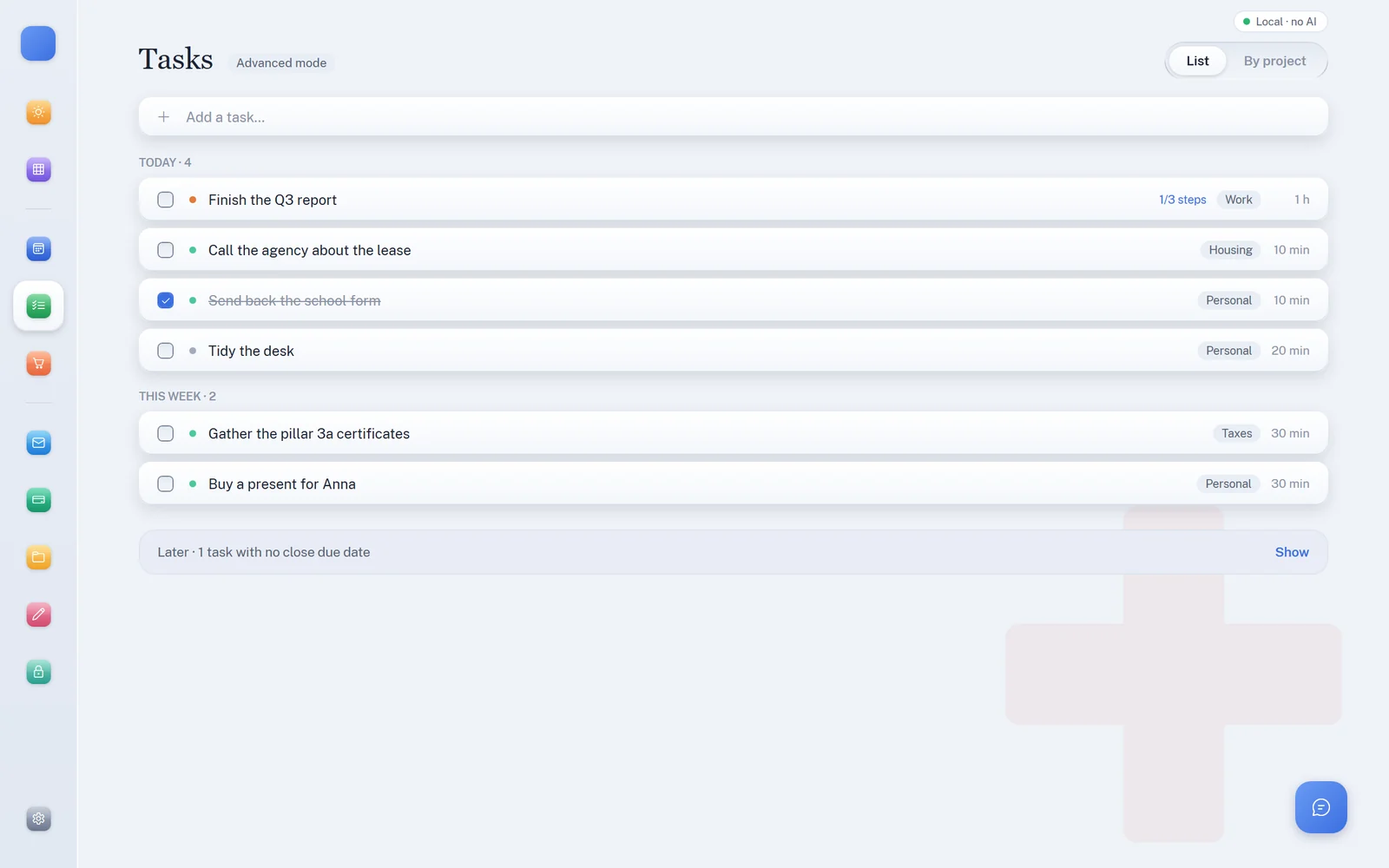
Today view suggests the next step, how long it takes, and nothing else. Start, adjust or move it to tomorrow: your day adapts.

A calendar that protects you

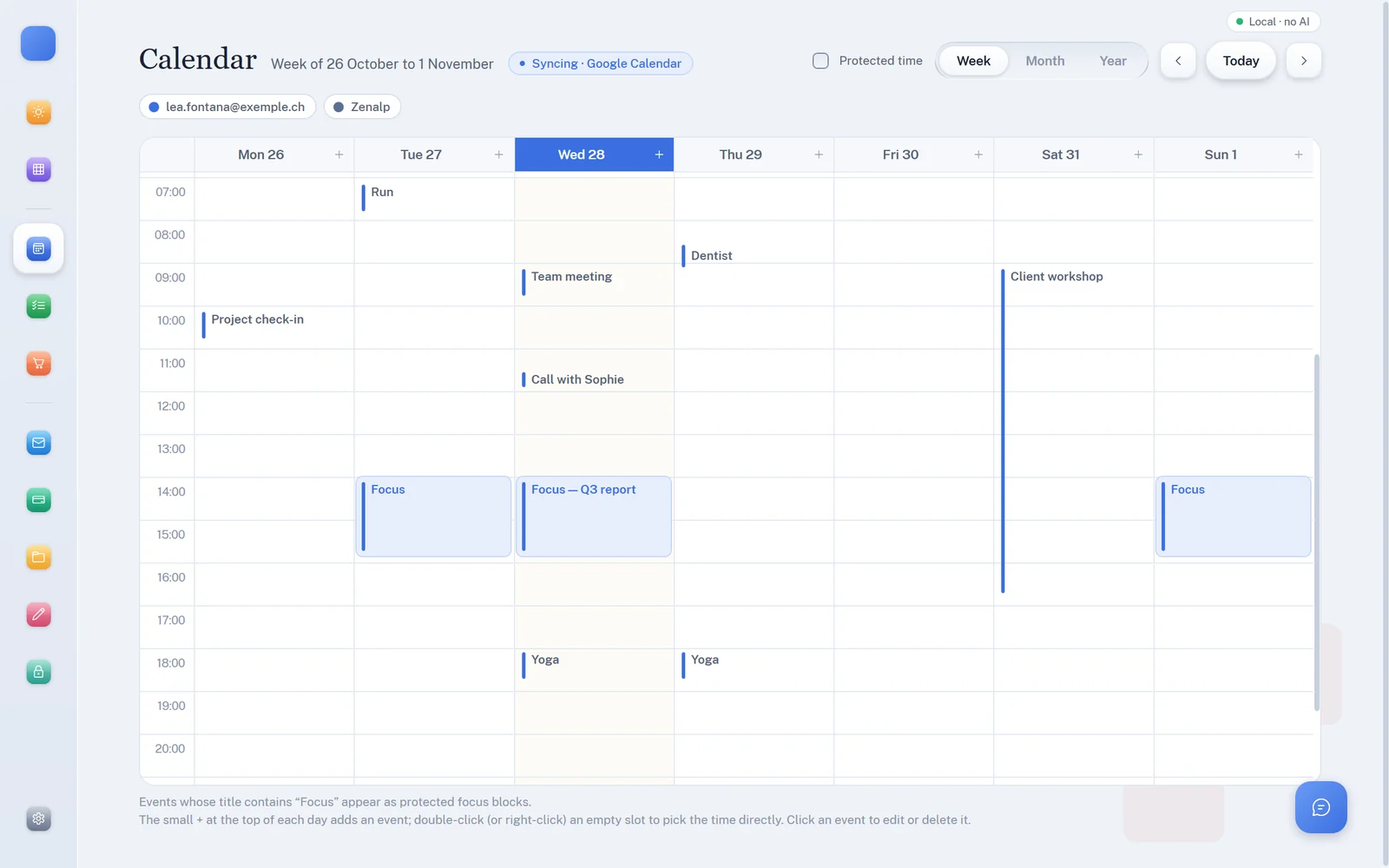
Protected focus blocks, sync with Google Calendar and Microsoft 365, deadlines spotted in your emails.

From vague to concrete

“Do the accounts” becomes four 15-minute micro-steps. And Ctrl + Alt + Space captures an idea from anywhere.

Email under control

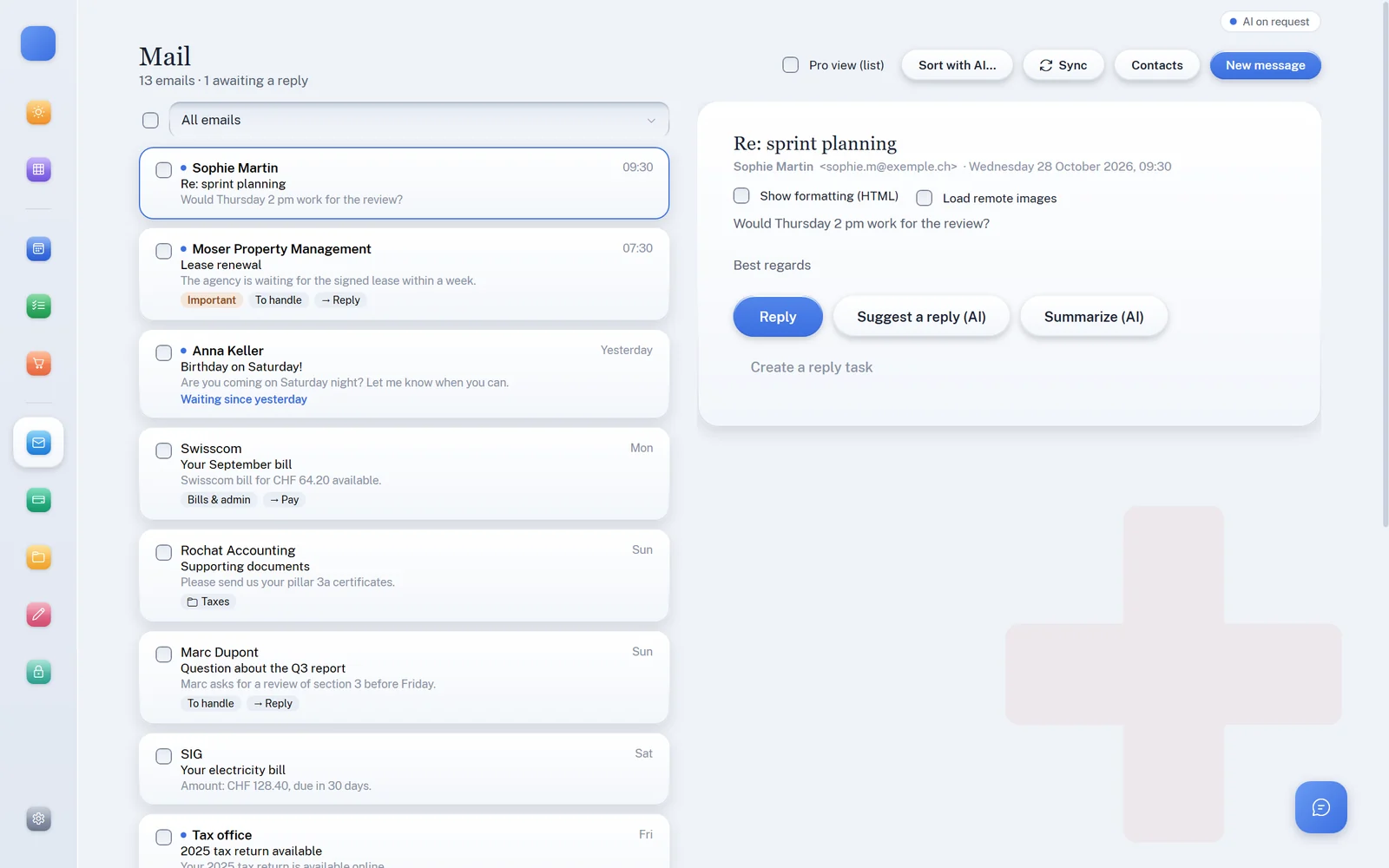
AI sorting and filing into your folders, thread summaries, reply drafts. Nothing is sent without your approval.

A budget under control

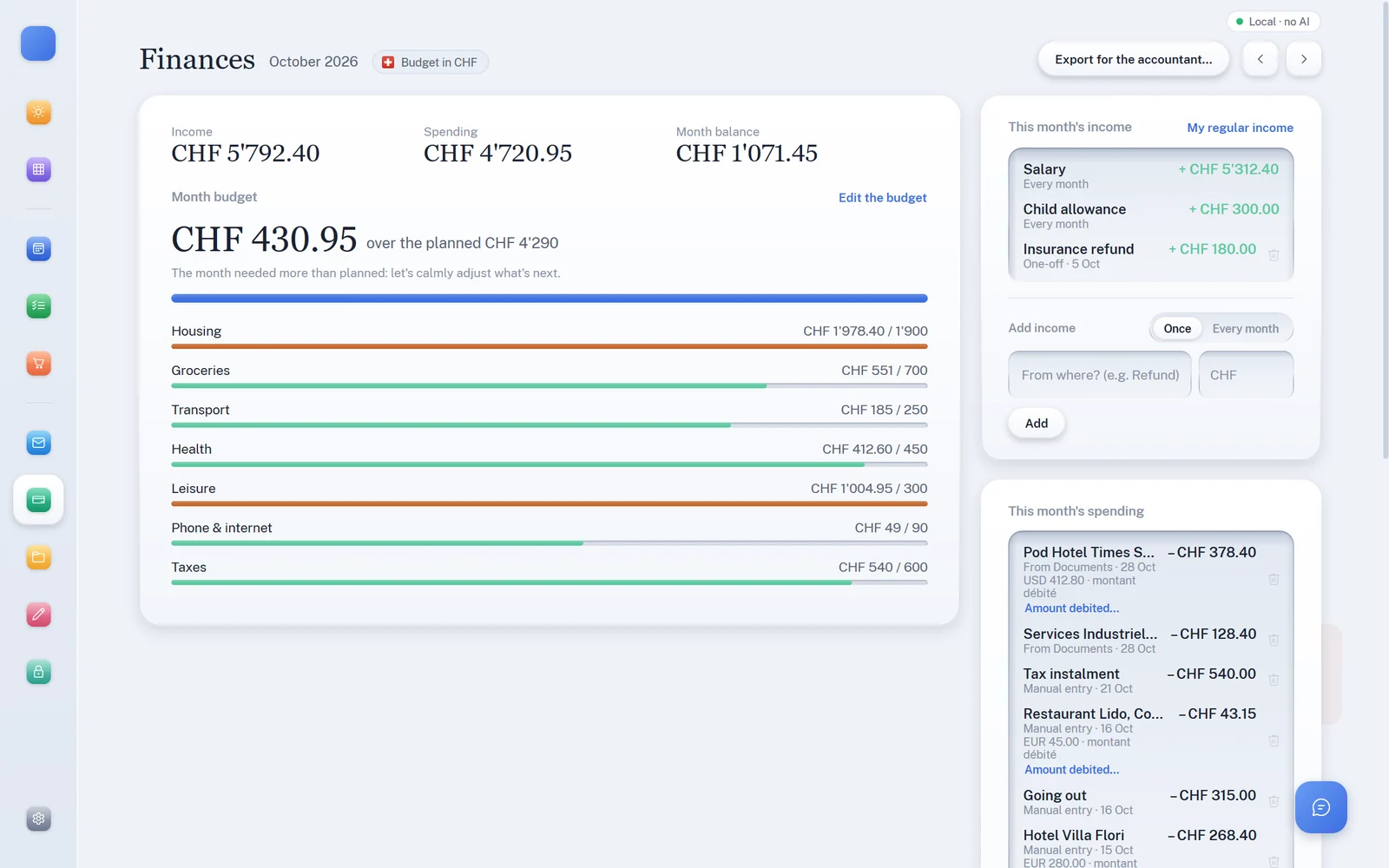
Income, expenses, monthly balance, budget per category. A clear alert as soon as a category nears its limit.

Documents that file themselves

Scan or drop in a PDF: QR-bill read, text recognised and document filed by the local AI, on your PC. The sender is remembered for next time.

An assistant, not a chatbot

It creates a task, checks the budget, suggests a slot, drafts an email. And in Coach mode, it helps you set your priorities and keep up the pace.

Even the fridge

A weekly menu to suit your tastes and budget, a shopping list by aisle, and an editor for your letters and replies.

AI document sorting

Filing that learns from you

Approve a sender once: all their following bills file themselves. Whatever is left is filed by the local AI, on your PC — and never by an AI on your payment data.

Scan, import or drag and drop

PDF, photo or scan: everything lands in a single library, encrypted on your PC.

Structured bills are read by code

Swiss QR-bill, SEPA QR, Factur-X: creditor, IBAN, amount and reference extracted with no AI at all.

Everything else is read on your computer

Local text recognition (OCR), no network. The image never leaves your machine.

The local AI for an unknown sender

It suggests a type, a category and an urgency level, without the document leaving your PC. With an online AI, it only receives a redacted, truncated text, never the file.

You approve, Zenalp remembers

The rule “this sender → this category” is kept. No more AI calls for the next ones.

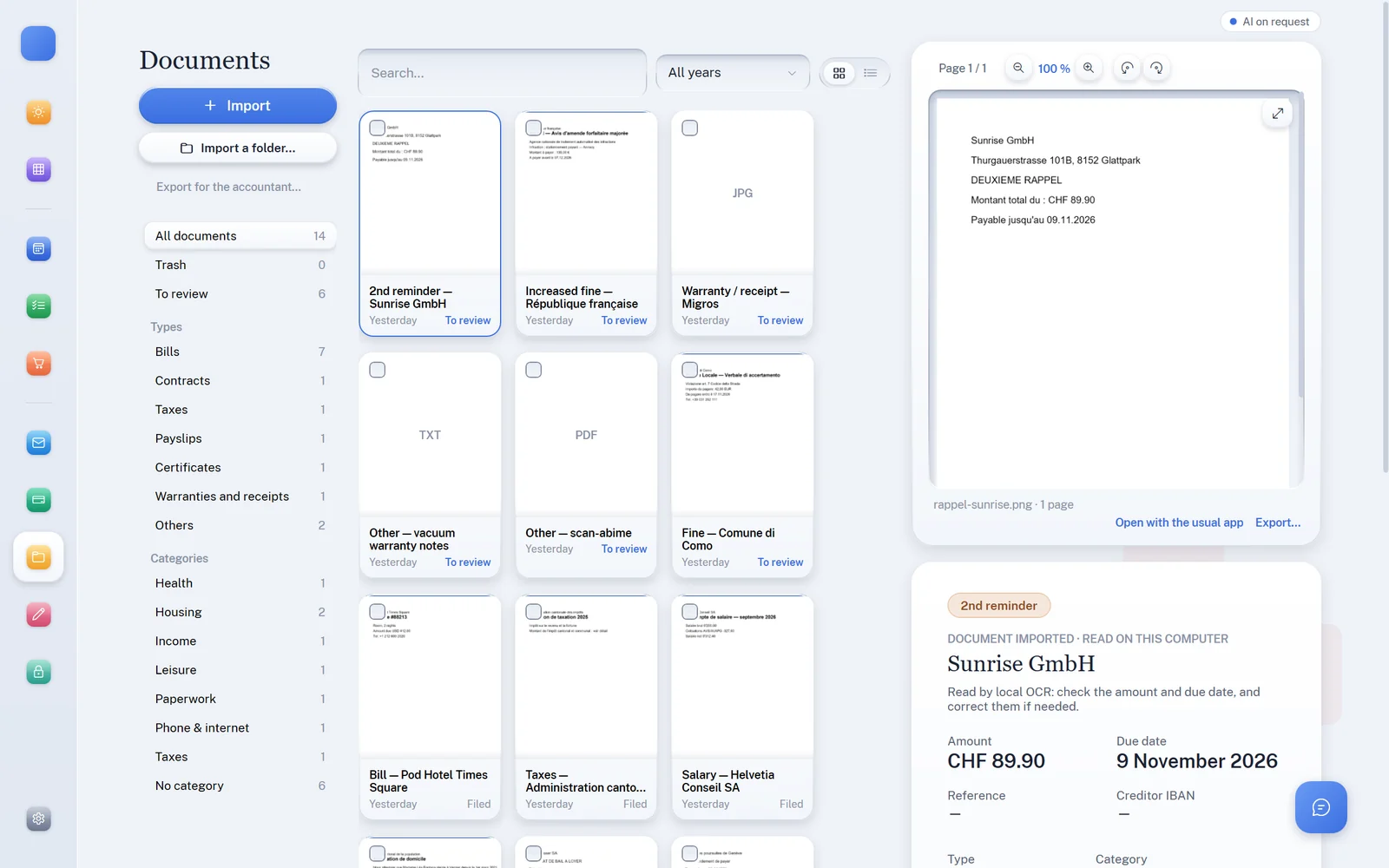
Documents screen: library sorted by type and category, bill read automatically from the Swiss QR-bill with amount, reference and IBAN.

Reminders no longer slip through. Zenalp tells an invoice from a reminder, a formal notice or debt enforcement. An urgent document rises to the top of your day — and the assistant can propose a payment plan that fits your budget.

Try it with our fictitious sample invoices →

When your domains overlap

Agents that work together

Each domain has its own specialised agent. When a situation touches several of them, Zenalp connects the dots for you — then lets you decide.

A payment reminder arrives

Documents spots the reminder, Finances compares it with the month’s balance: pay in one go, or spread it over several instalments. Tasks are proposed, not imposed.

An email sets a deadline

“Please reply by Friday”: the deadline is detected and Zenalp suggests the first free slot, preferably in a focus block.

Your week, at a glance

The Overview brings together calendar, email, finances and documents: what's done, what's moving, what's waiting.

Personal & professional

At home and at the office

Same engine, two ways of working. Switch from one to the other in a click in Settings.

Guided mode · personal use

To get better organised, every day

For anyone who wants to take back control of their everyday life. Zenalp sorts, reminds and suggests the next step: you make progress without keeping everything in your head.

  • One priority at a time, broken into 15-minute steps.
  • Bills, insurance, taxes: nothing is forgotten, everything is filed.
  • Household budget, weekly menus and shopping.
  • An organisation coach on request: priorities, planning, motivation.
Assistant panel in Organisation coach mode: priorities and planning, based on summarised signals.
Pro mode · professional use

To go fast, and far

Dense views, full backlog, keyboard shortcuts: everything you need for demanding use, with the same privacy.

  • Today’s priorities and the full backlog at a glance.
  • Email in an Outlook-style Pro view: folders, sortable columns, batch processing.
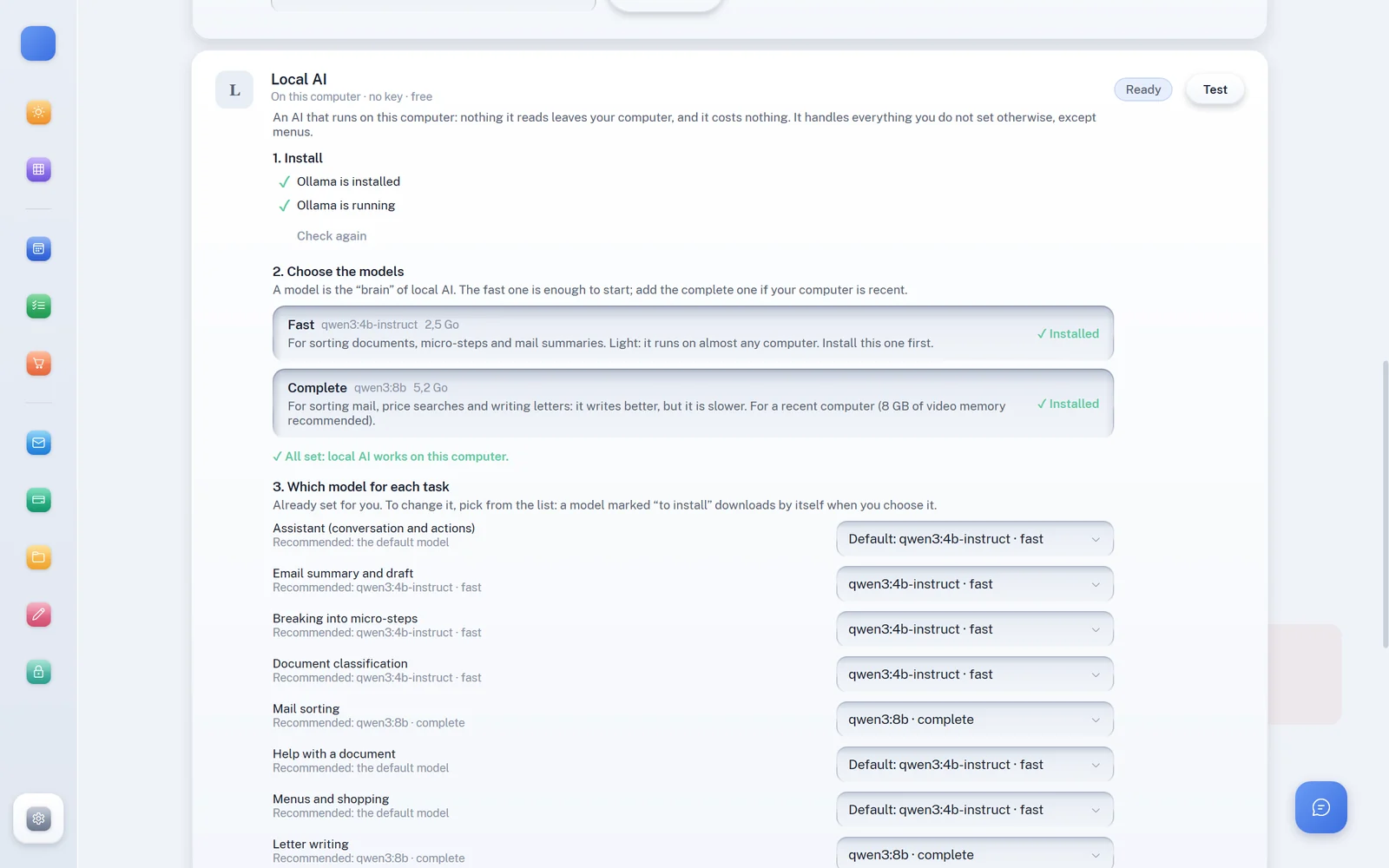
  • One model per task: the fast local AI for sorting, the more complete one for writing, an online AI as a back-up.
  • Several encrypted accounts on the same computer, separate and sealed off.
Today view in Pro mode: today’s priorities as a dense list and cross-domain proposals.

Security & privacy

Your AI works at home

Most AI assistants send your data to their cloud. Zenalp does the opposite: the AI runs on your PC. And if you choose an online AI, it only receives a masked text that you review.

CriterionZenalpTypical online AI assistant
Where your data livesOn your PC, in an AES-256 encrypted databaseOn the vendor’s servers
Online accountNone — a local, password-protected accountRequired
Intermediate serverNone: the local AI runs on your PC; an online AI is called directly, with your own keyYour requests go through the vendor
What goes to the AIWith the local AI: nothing. With an online AI: a masked text (names, companies, addresses, numbers) that you reviewOften the whole document or image
Payment dataQR-bills read by code, never by an AIAnalysed by the model
See before sendingThe exact, editable text and the estimated cost, before every online requestRarely
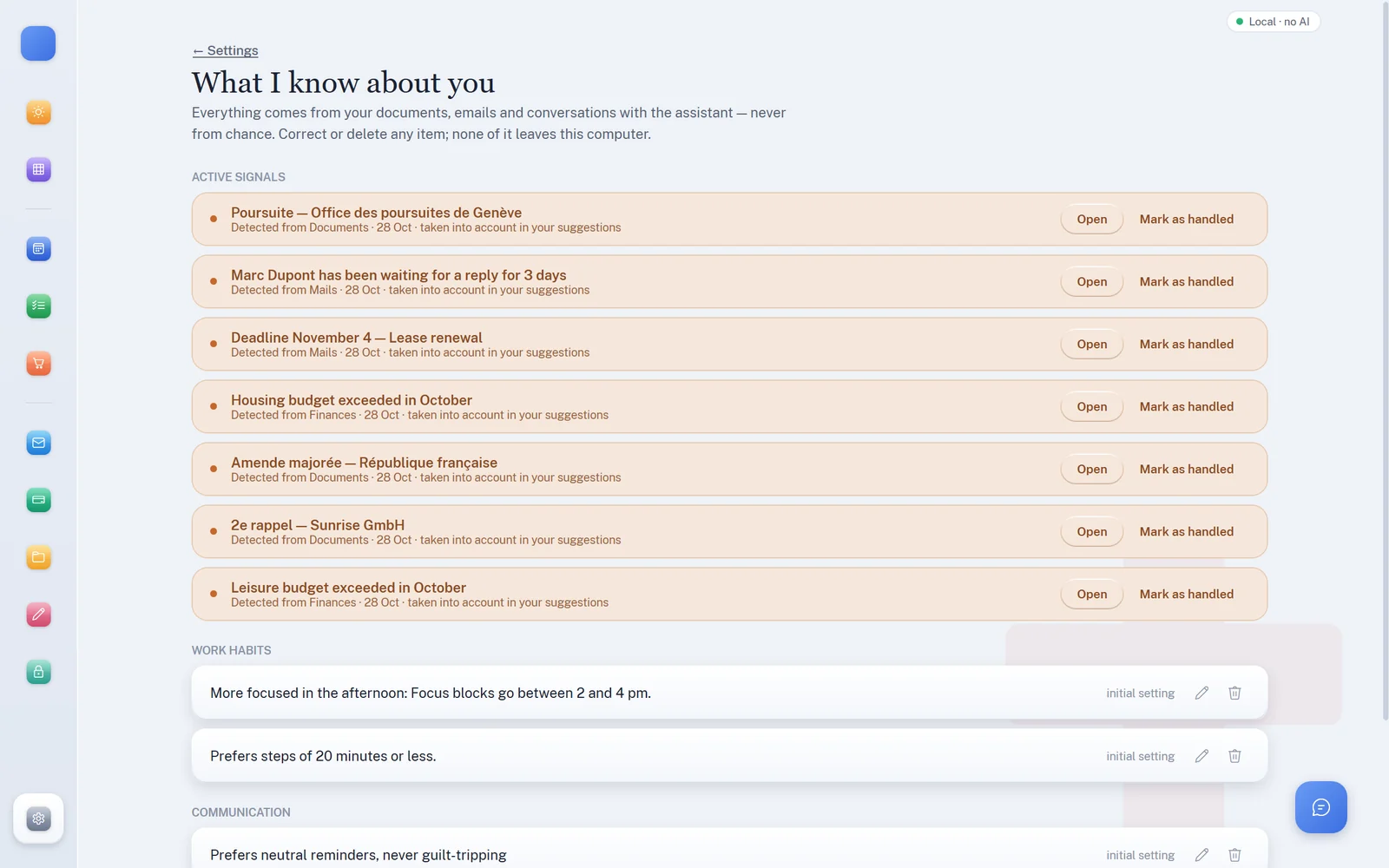
What the app knows about youEverything listed, editable, erasable in one clickMemory hard to see
Automatic actionsNone: nothing is sent, paid or filed without your clickVaries by service

Comparison with how mainstream cloud-hosted AI assistants typically work; practices vary from one service to another.

0requests sent with the local AI: nothing leaves your PC
AES-256encryption of the database and of every document
600,000PBKDF2 iterations to protect your password
100%of QR-bills read without AI

Use cases

Made for everyone buried in paperwork

Accounting firms, lawyers, property managers, practices, tradespeople: wherever documents are received, sorted and filed every day, Zenalp saves hours — without ever exposing your clients’ files.

Accounting firms

Supplier invoices, QR-bills, statements: read, filed and encrypted automatically, with reminders spotted before the due date.

Lawyers & notaries

Letters and procedural deadlines: deadlines detected in emails and blocked in the calendar — professional secrecy preserved.

Property managers

Maintenance invoices, tenant letters, reminders: every document in the right place, every urgent matter at the top of the list.

Health practices

Therapists, physios, medical practices: admin sorted by an AI that stays in the practice, with no third-party cloud.

Tradespeople & SMEs

Quotes, supplier invoices, client emails: the office kept up to date in ten minutes in the evening, not at the weekend.

Freelancers & executive assistants

Freelancers, executive assistants: email, calendar and paperwork in one tool, in Pro mode.

Business plugins

For accounting firms and lawyers

Two plugins offered on request, switched on in Settings → Modules. No AI, on your computer — Zenalp prepares, the accounts and legal work stay yours.

Fiduciary plugin

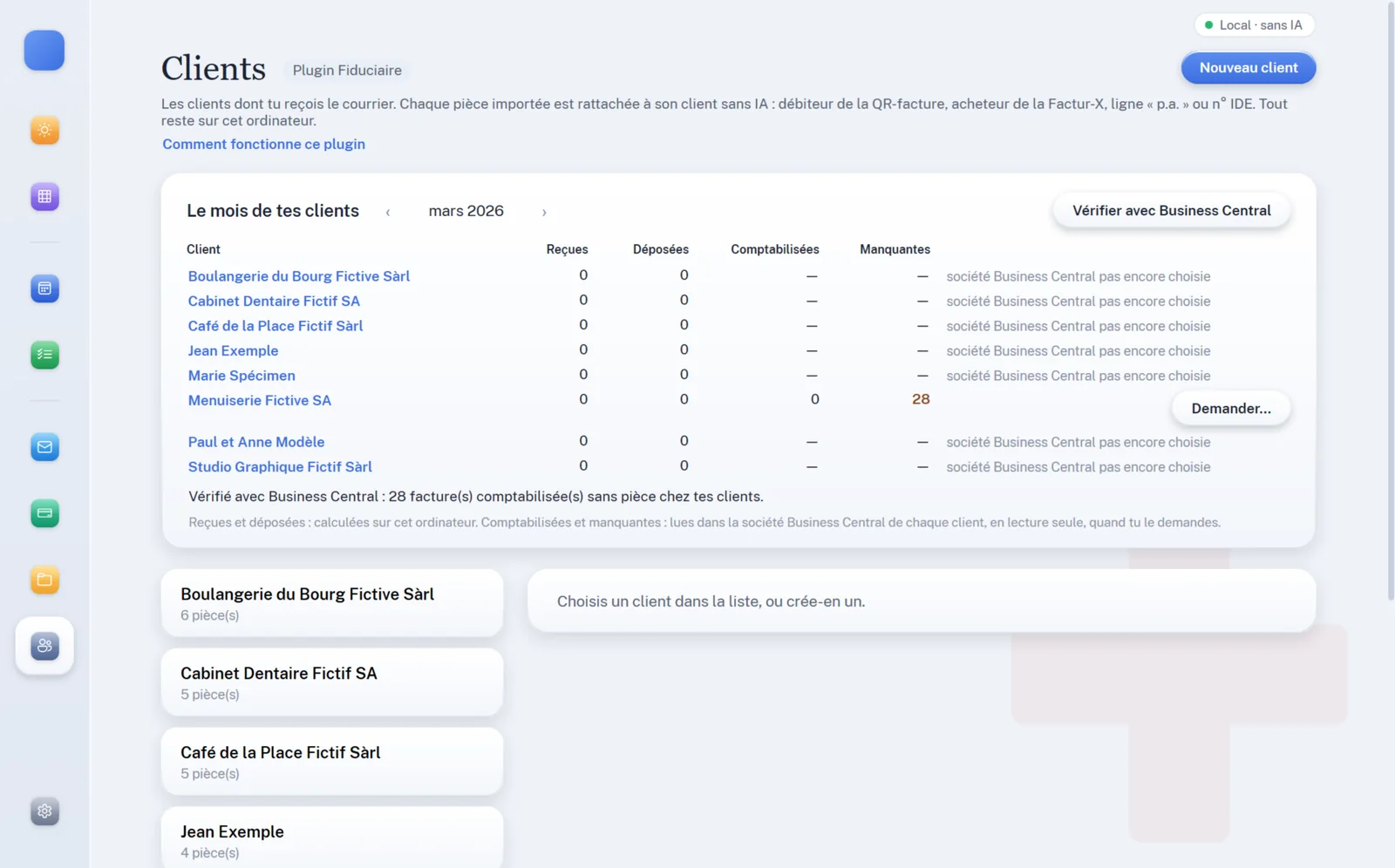
Every document matched to its client without AI (QR-bill, Factur-X, “c/o”, company ID), export for the accountant client by client, reconciliation and draft filing in Business Central, a monthly dashboard and requests for missing documents.

Lawyers plugin

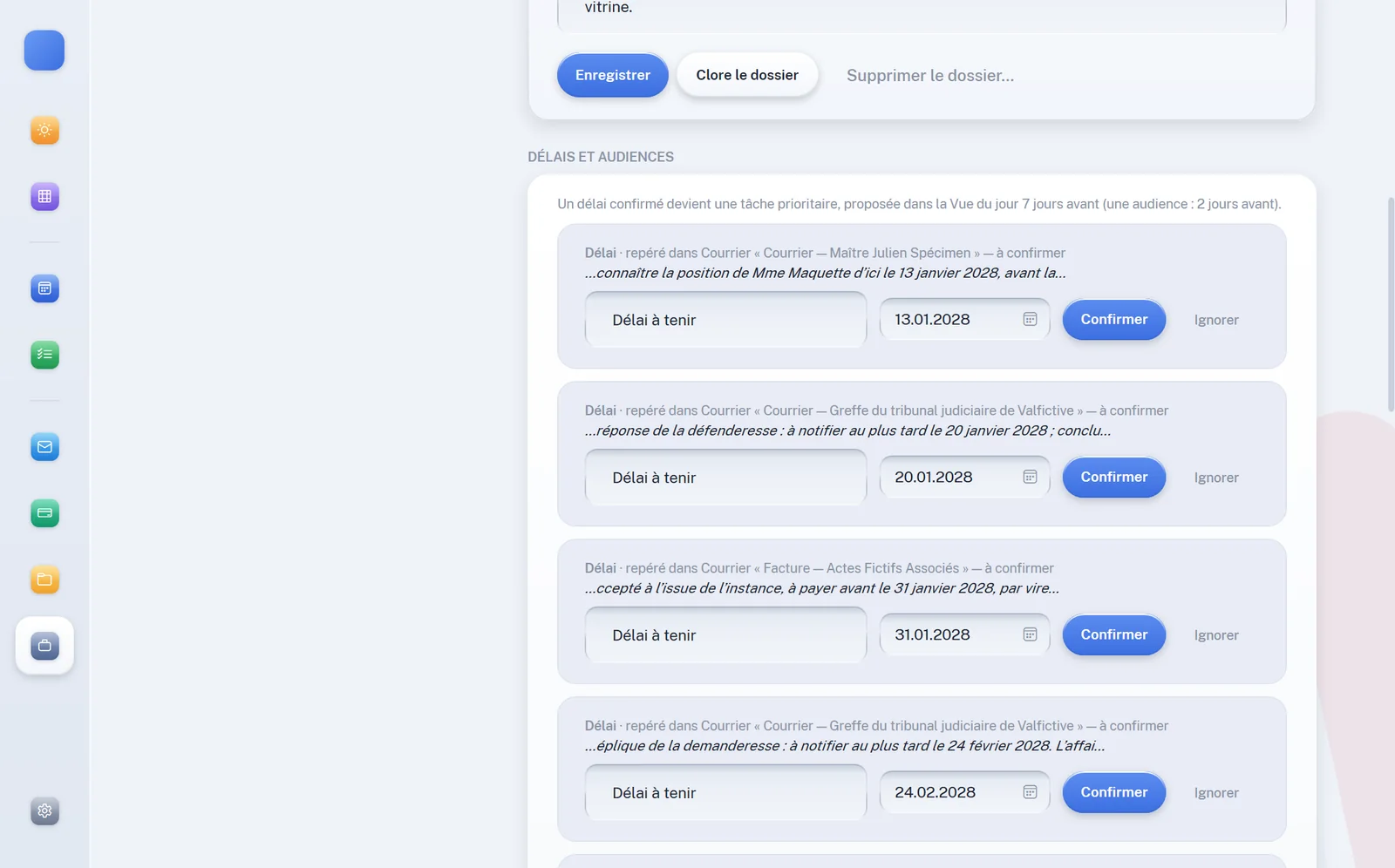
Client matters, flagged conflicts of interest, linked documents, mails and appointments, deadlines and hearings spotted in the post and confirmed by you, time recorded and draft fee notes in Word.

Preview

Calm by default, powerful when needed

A warm interface, one colour per section, and never more than what you need right now.

Frequently asked questions

Good to know

Do I need an AI subscription to use Zenalp?

No. Calendar, tasks, budget, QR-bill reading and text recognition all work without any AI. For the smart features (assistant, sorting, summaries, filing, micro-steps), the local AI installs in one click and runs on your PC, with no key and no usage costs. If you also want an online AI, you plug in your own key from Anthropic, OpenAI, Google Gemini or xAI Grok: you pay the provider directly, with no margin for us.

What is the local AI?

An AI model installed on your computer with Ollama, a free piece of software. Zenalp installs it for you in one click (Settings → AI): it sorts and summarises your emails, files your documents, breaks down your tasks and writes, without sending anything over the internet. For long conversations an online AI is still stronger: you can add one, task by task.

Is my computer powerful enough?

The “Fast” model (about 2.5 GB) runs on most recent computers, faster with a graphics card. The “Complete” model (about 5.2 GB) needs a recent computer; 8 GB of video memory is recommended. Zenalp shows you what is installed and lets you choose the model for each task.

Do I have to pay for Ollama or the models?

No. Ollama is free software (MIT licence) and the models Zenalp recommends are under the Apache 2.0 licence: no account, no subscription. They are downloaded from their official sources, onto your computer.

Does my data go through your servers?

Never. Zenalp has no data server: the application runs entirely on your PC, and so does the local AI. If you choose an online AI, the request goes straight from your computer to that provider, with a masked text you can review.

Which email and calendar services are supported?

Gmail and Google Calendar, Outlook and Microsoft 365, as well as other mail services via IMAP (for example Proton via Bridge or mail.ch) and CalDAV calendars. You can also use the calendar without any connected account.

Does Zenalp work without an internet connection?

Yes, for the essentials: your documents, budget, tasks, bill reading and the local AI work offline. Only email and calendar sync and an online AI need the internet.

Which countries and languages?

The interface is available in English, French, German and Italian. Bill reading and currency are tailored to Switzerland (QR-bill, CHF), France (Factur-X, SEPA QR, euros) and the United States (dollars, past-due and final notices, collection letters, traffic and parking citations; payment links checked before opening, and the details ready for your bank’s bill pay). More countries are in preparation.

What if I forget my password?

You are given a recovery key when you create your account: keep it safe. Without your password or recovery key, your data stays unreadable — by design. There is no back door, not even for us.

Is there a Mac or mobile version?

Zenalp is currently a native Windows application (Windows 10 and 11). Other platforms may follow depending on demand.

How do updates work?

Zenalp regularly checks whether a new version exists, but never installs it without you: you are notified, and the update is only applied after your click.

Get your clear mind back.

Download Zenalp and let it sort out the rest. Installs in a minute, no online account.